ursocHARNESS

For business owners & small teams

Your next big idea.
Finally
moving.

The website you need. The tool your team keeps asking for. The process you’re tired of doing by hand.

Harness is your workspace for turning business ideas into websites and tools. Work with an AI agent that can plan, design, build and test—while you set the priorities and review the results.

Have an idea in mind? Let’s explore the right setup, scope and costs for your business.

From the first brief to the next improvement

PLAN → DESIGN → BUILD → TEST → OPERATE → GROW

Put it to work

What’s been sitting
on your “someday” list?

Start with a problem you already recognize: missed inquiries, scattered spreadsheets, or improvements your team keeps putting off.

01 / WIN MORE WORK

Help the right customers take the next step.

Make your services easier to understand and your business easier to contact. Build or improve your pages, sharpen the copy, and make the inquiry journey work on a phone.

YOUR FIRST PROJECT COULD BE“Turn our services into a site that helps the right customers ask for a quote.”
02 / GET TIME BACK

Give the daily work a better home.

Bring bookings, quotes, inventory or client updates into a tool shaped around your process. Give your team a clearer view of what needs attention next.

YOUR FIRST PROJECT COULD BE“Replace this spreadsheet process with a simple tool my team can use.”
03 / KEEP IMPROVING

Move a useful improvement off the backlog.

Fix a recurring bug, simplify a frustrating screen or add the feature customers keep asking for. Build on your existing software as your business changes.

YOUR FIRST PROJECT COULD BE“Find why customers get stuck here, propose a fix, and test the change.”

02 / Make yourself at home

See the work.
Keep the conversation going.

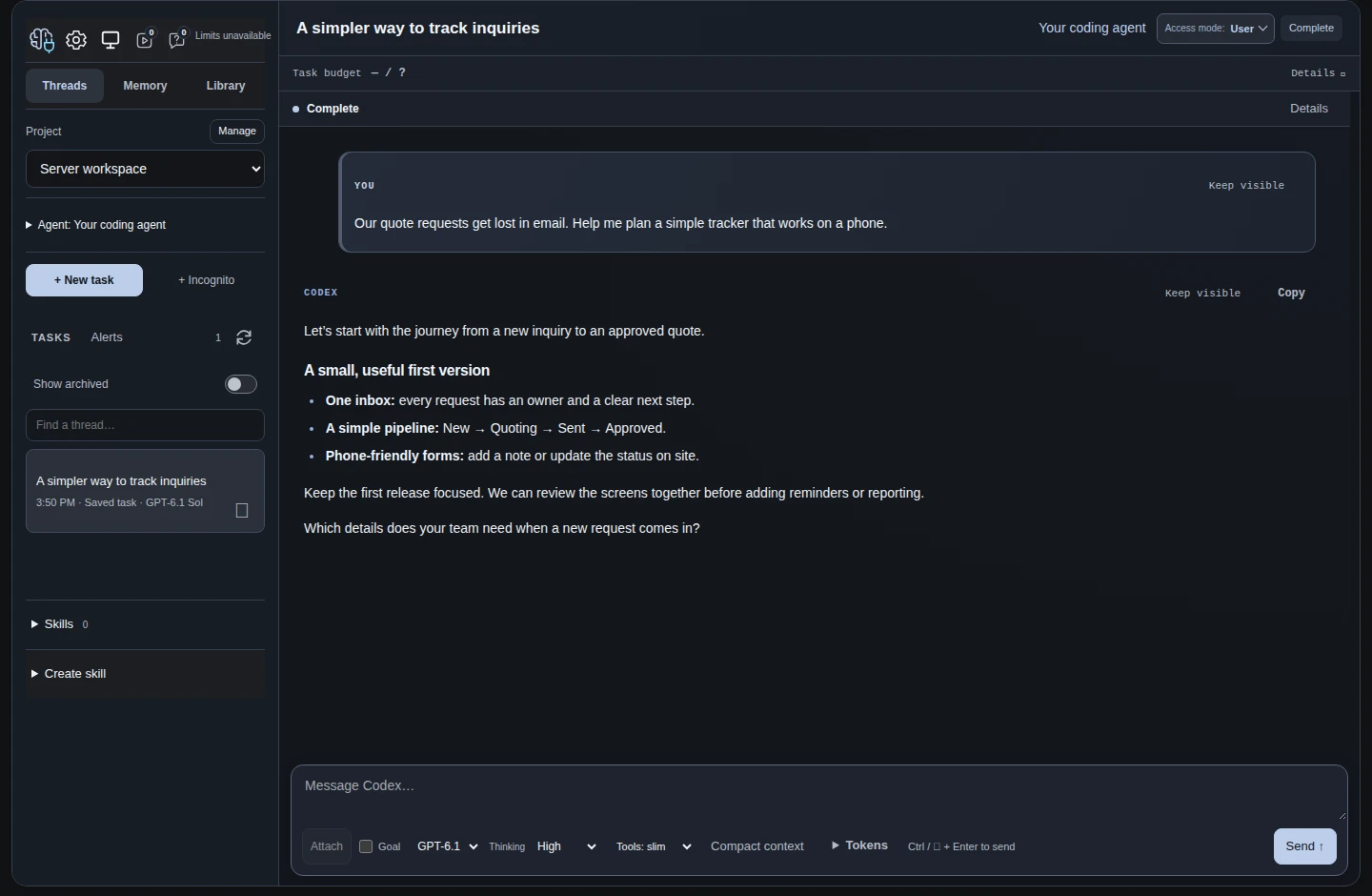
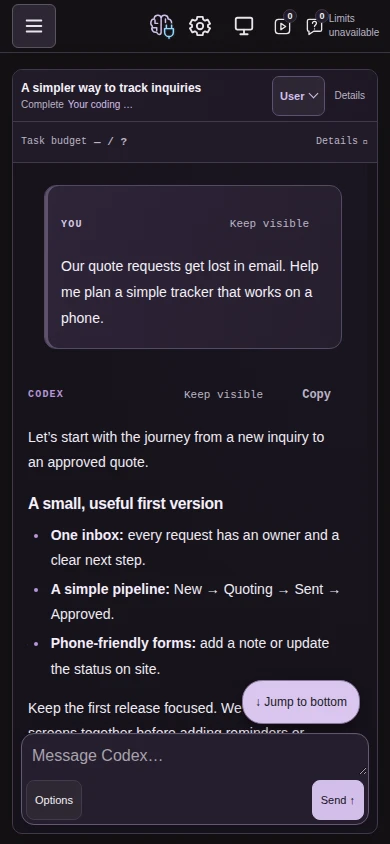
Discuss an idea, read through a plan and steer the next step in the same workspace. Move between your desk and phone as the day takes you elsewhere.

MOONRISE / DESKTOPOpen full screenshot
A sample conversation about planning a quote tracker in the blue Moonrise desktop theme.
Planning a quote tracker · Moonrise theme · Sample conversation
AMETHYST / MOBILE
The sample quote-tracker conversation on a phone-sized screen in the purple Amethyst theme.
Follow the same project on your phone · Sample conversation
Open full mobile screenshot →

A little personality goes a long way

Same capable workspace.
A completely different mood.

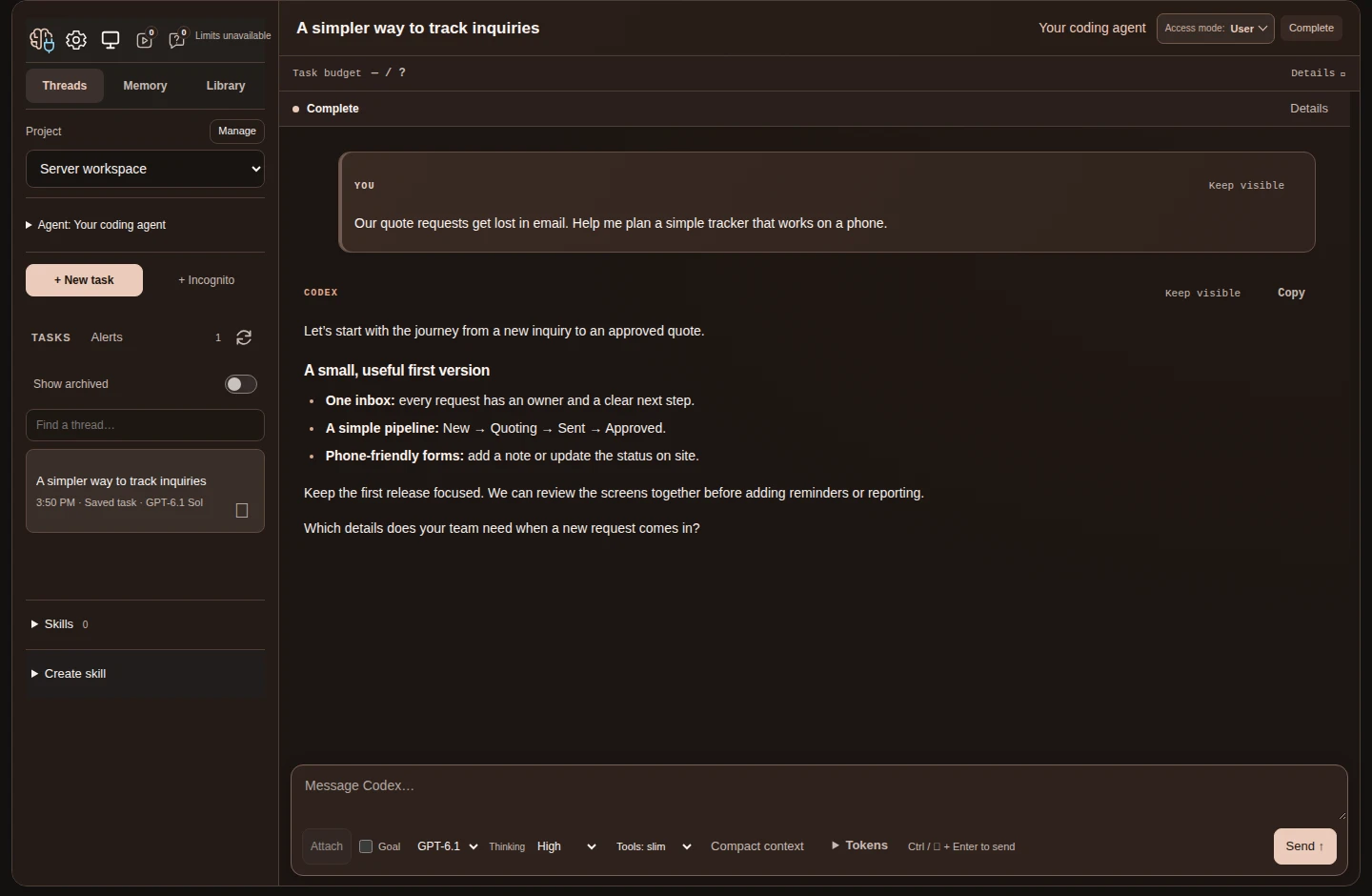
Choose a color, pair it with an app icon, and make the interface feel like yours. Start with a built-in theme, or work with your agent on a custom look.

SUNROOM / DESKTOP
The sample quote-tracker conversation in the coral Sunroom desktop theme.
Sunroom theme · Open full screenshot →

03 / A place on your Home Screen

Big plans.
Pocket-sized entrance.

Open your Harness from an icon on your iPhone. No App Store required.

Keep your projects a tap away. Read a reply between appointments, share a new idea while it’s fresh, or pick up a conversation away from your desk.

Add Harness to your Home Screen through your browser. You’ll need an internet connection and sign-in to use your workspace.

Home Screen illustration · Harness web app

AI support across your project

The skills your project needs.
In one workspace.

Work with an AI agent across planning, design, development and marketing. Keep the brief and decisions together as the work moves from one discipline to the next.

Project manager

Shape a clear brief, break the work into manageable steps and follow progress toward your goal.

A practical plan for what to tackle first.

UX & UI designer

Help customers find what they need and your team finish everyday tasks. Refine the layout, forms and navigation together.

Clearer screens across phone and desktop.

Senior developer

Build features, investigate bugs and improve existing code, with explanations that help you weigh the options.

Progress on the backlog that matters to your business.

QA & test engineer

Exercise key customer journeys, look for failure cases and help repair the issues found during testing.

More confidence before a change reaches your customers.

DevOps & system administrator

Prepare releases, backup plans and maintenance tasks for supported servers, with the access you approve.

Help with the technical work behind a dependable website.

Marketer & copywriter

Explain your offer clearly, draft service pages and campaigns, and adapt the message to the customers you want to reach.

A clearer story for your business, in your voice.

Researcher & analyst

Research a question, compare options and explore information you choose to share. Use the findings to plan your next move.

Better-grounded choices about where to invest your time.

A collaborator for your team

Organize separate projects and conversations. Where collaboration is set up, connect agents to exchange work you choose to share.

Less repeating the brief as a project grows.
Give your ideas more room.
Give your team more capacity.

Take on a focused project yourself or give your existing team help with implementation. Harness provides AI assistance across these disciplines; you still own the decisions and bring in specialist review where the work needs it.

Your first project, step by step

Start with the problem.
Build from there.

1

Tell us what’s getting in the way

A rough idea is enough. Describe the task, website or workflow you want to improve and who it needs to work for.

2

Agree on a useful starting point

Discuss the setup, scope and costs. Choose a first project small enough to try, review and learn from.

3

Work with your AI agent

Ask for a plan, build the first version and try the result. Give feedback and use available previews and tests to guide changes.

4

Improve it as you go

Review changes before publishing. Keep the project and its decisions together for the next fix, feature or new idea.

Built for work that keeps evolving

Pick up where
your project left off.

Keep your files, conversations and project brief in one place. Spend more of your next session moving the work forward.

We’ll discuss which tools, connections and hosting setup your project needs before you get started.

Find your first use case
Projects & working context
Keep each project’s files, conversations and brief together so it’s easier to return to the right work.
Goals & visible progress
Give the agent a goal and a work allowance. Follow progress, adjust the direction or pause when you need to reconsider.
Connected tools
Connect supported services so your agent can help with work across your business systems. You choose which connections and actions to allow.
Review & recovery
Review changes before they go live and keep project snapshots you can return to. For a live website, plan backups for its data as well as its files.
Recurring work
Schedule supported routines, such as reviewing project information or preparing a regular summary, with clear instructions and a work allowance.
Portable project drafts
Export supported project files and context when you need to share or move a draft. A live website’s data and service connections need a separate handover plan.
Access & spending controls
Decide what your agent may access and set allowances for its work. Keep service credentials in the vault and review hosting, AI and integration costs before starting.

Built around your business

Start where the friction is.

One repeated task. One broken workflow.
One idea worth trying.

A strong fit when…

  • You know your business, but need help turning that knowledge into software.
  • Your team has a growing backlog of useful, well-scoped improvements.
  • You want to inspect the work, give feedback, and stay involved in decisions.

Harness works best when you can try the results and give feedback. AI can make mistakes; work involving sensitive data, security or critical operations needs qualified review.

Ethics & control

Your values.
Part of the work.

Give your agent practical guidance for working with your customers, your information and your business.

Guidance shaped around your company

Harness includes ethical guidelines you can adapt to your company. Define the principles you want your agent to follow—from handling sensitive information to communicating honestly with customers.

Your guidelines work alongside access permissions, your AI provider’s safeguards and your review of the work.

Discuss your requirements

Before you jump in

Good questions.
Straight answers.

Do I need to know how to code?

You can begin in plain language: explain what you want to improve, look at the result and ask for changes. You don’t need to write the code yourself to take part. More complex projects still need technical help for setup, security and maintenance.

Can it replace an engineering team?

Harness can help you take on a small project or give your existing team more capacity across design, development, testing and operations. The right amount of human support depends on the project. Critical architecture, security and business decisions still need accountable people.

Can it work on a website I already have?

Often, yes. Share the platform you use and the change you have in mind so we can discuss what access is needed and what is practical. Your existing software and hosting will shape the options.

How is this different from a normal AI chat?

Your conversation stays connected to the project’s files and tools. With the access you approve, the agent can make changes, run available checks and keep working toward a goal. You can inspect the result and carry the project into your next session.

What does it cost, and how do I get started?

Tell us about your first project so we can discuss the right setup and costs. Hosting, setup and any paid integrations are considered separately. You connect your own AI provider account; its subscription or usage costs are also separate. Agree on the scope and costs before committing.

Where does my information go?

Your project files and conversation history are kept on the hosting used for your Harness. Relevant context is sent to your connected AI provider during work, and connected services may process information too. Discuss sensitive-data requirements before sharing or connecting that information.

Let’s make it useful

What would you build
if you had more hands?

Let’s find a useful first project for your Harness.

Tell us what you want to improve and how your business handles it today. We can discuss whether Harness fits, what you’d need to get started and the likely scope and costs.

Tell us about your project

Tell us a little about your business. You can review your message before sending it. All fields are required.

What do you do, what’s getting in the way, and what would a better result look like? 20–5,000 characters. Please leave out passwords and sensitive customer data.

You’ll review your message on ursoc.net, then confirm to email us. We use your details to respond to your inquiry; you won’t be added to a mailing list. Contact privacy details.

Know someone with a big backlog?

Send a little possibility their way.

Share Harness with a business partner or teammate and choose a project you’d like to tackle together.

Contact form privacy

Your name, email address and message go through ursoc.net to harness@mbenji.dev so we can respond to your inquiry. You review and confirm before sending. You won’t be subscribed to a mailing list. This form uses an essential session cookie and a coded identifier based on your network address to help prevent spam. Hourly spam-prevention records are cleared on the next submission after they expire. Hosting access logs may record your IP address, and our email provider processes your message. There are no advertising trackers on this page. To ask about your inquiry or request its deletion, email harness@mbenji.dev.